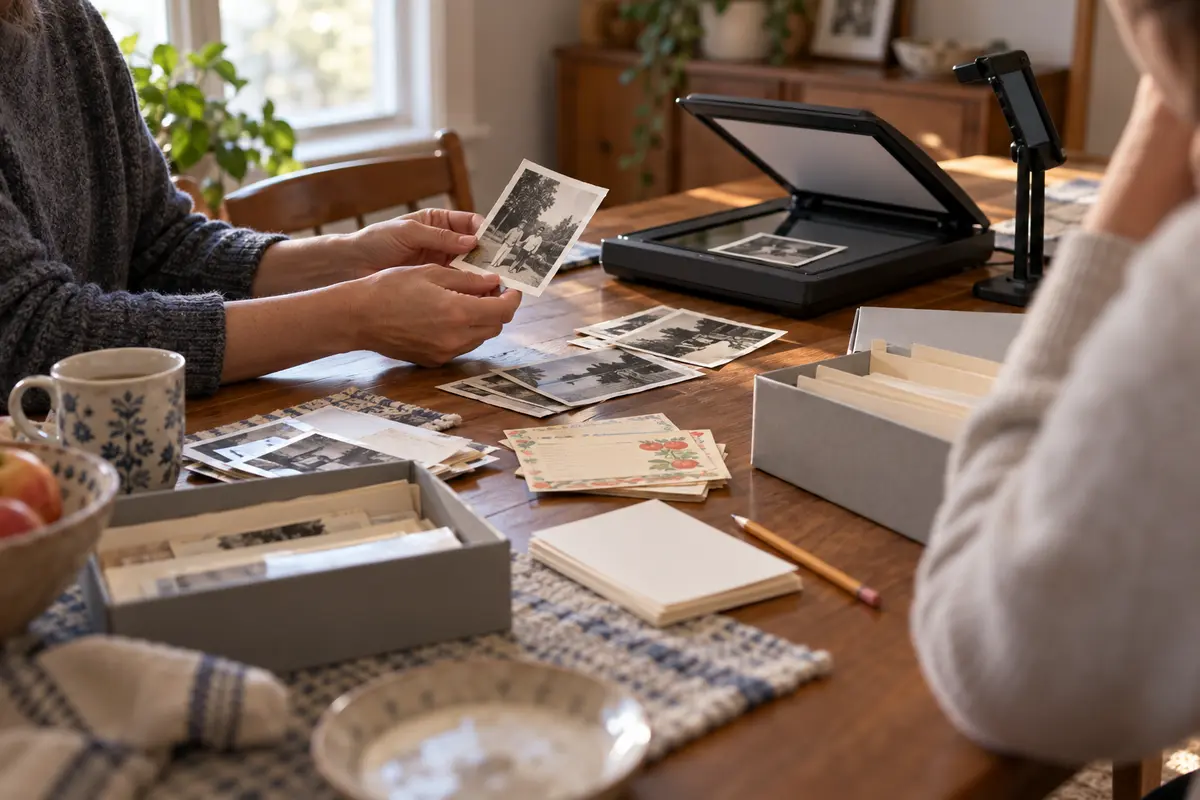
A family archive day should end with a small, usable collection, not a house full of unsorted boxes. Choose one shelf, folder, recipe, or person’s story. Decide who may access the material, describe what you actually know, and make a backup before sharing.
Keep the archive small and findable
Preservation is about access and context as much as keeping an object. A scan without a date, speaker, or permission record may create future confusion. Make a record that someone else can understand without requiring them to guess who is pictured or whether a story may be shared.
Choose, describe, and store one collection
- Set a small boundary. Choose one container, one recipe, or one person’s story. Decide the stop time before sorting begins.
- Name the access rules. Mark what is private, what can be shared with family, and what may be public. Confirm permissions with people represented.
- Create a simple inventory. Record item type, known date, people, story clue, source, and storage location. Leave unknown fields blank rather than inventing them.
- Make a second copy. For digital items, use a second storage location and a clear folder name. For fragile originals, keep handling minimal and return them safely.
- Close the session. Choose the next review date or declare the project complete. Put unresolved research on a separate list so the current archive can be used now.
Set the archive’s scope to your time
- One person working alone: Use the “known / not known” fields to protect against confident guesses.
- Family members disagree: Keep the disputed item private until the people involved agree on an access plan.
- A large collection: Split by person, year, or recipe and schedule another bounded session only if it remains valuable.
Prevent damage and privacy surprises
- Scanning everything: Select meaningful items and preserve the originals safely.
- Ignoring privacy: An archive can be private and still be valuable.
- Leaving digital files on one device: Keep a second copy and write down how to find it.
Example: a box of recipe cards
A family chooses six photographs and one handwritten recipe. They label names only when known, ask living people before sharing their stories, and store a backup in a shared family folder with restricted access. The rest of the box remains untouched for another day.
Protect originals while making a useful copy
Handle photographs and paper with clean, dry hands and support brittle items on a flat surface. Do not use tape, glue, pens, or household cleaners on originals. If an item is fragile, moldy, or valuable, stop and ask an archivist or conservator before cleaning or scanning it.
For digital copies, use a consistent filename with date, person-approved name, and item description. Capture both sides of a photograph when handwriting matters. Note where the original came from, but do not infer identities or dates from resemblance alone.
Set access rules before sharing
Ask people represented in recordings, letters, photographs, and stories what they are comfortable sharing. An archive can have different levels: private to the keeper, shared with named relatives, or cleared for public use. Record permission and any limits.
Back up files in a second secure location and check that you can open them. Use formats and names a trusted family member can understand. Avoid posting sensitive documents, addresses, or personal histories publicly just because uploading is easy.
A modest digital preservation routine
Keep one master copy and one backup in a separate location. For important files, occasionally check that both copies open and that filenames still make sense. Do not rely on a single phone or an account you may lose access to.
Avoid destructive edits to the only copy. Save a cleaned or cropped version separately, and retain the original scan. If a person asks that a private recording be removed, track and delete the copies you control, including backups where feasible.
Choose what deserves attention today
Start with material that matters to someone and can be handled safely in the time available. One envelope of photographs or a small folder of scanned papers is enough. Skip anything fragile, moldy, water-damaged, or potentially valuable until you can ask a qualified archivist or conservator how to proceed. Ordinary household tape, glue, cleaning products, and ballpoint ink can cause permanent damage.
Before scanning, make a small inventory: item type, known date, known people, where it came from, who has permission to view it, and where the digital copy will be stored. Use “unknown” when you do not know. A confident guess about a person or date can become a false family fact once it is copied and shared.
Make scans that remain useful
Use a clean flat surface and even light. For a phone capture, keep the camera parallel to the item, include all edges, and check focus before moving on. Photograph the back of a print when it contains handwriting. Avoid aggressive cropping or filters on the preservation copy; make a separate access copy if you need to brighten or share it. Preserve the highest-quality original file you can reasonably store, then make a smaller copy for everyday viewing.
Use consistent filenames such as date-known_person-approved_topic, leaving uncertain dates out rather than inventing them. Save files in a folder that another trusted family member can understand. Keep one master copy and a separate backup, and test that both open. A cloud folder is not automatically private; review who has access before adding recordings or sensitive documents.
Treat permissions as part of the record
Ask living people before digitizing or sharing their letters, photographs, or recorded stories when the material is personal. Record who agreed, what they agreed to, and any limits on audience or future use. Consent to keep a private family copy does not mean permission to post it publicly. If someone later asks you to remove a copy you control, do so and update the access note.
Close the session by returning originals to their usual safe place and writing one next step. The archive can remain unfinished; a small collection with accurate descriptions and clear access rules is more usable than a large box of unnamed files.
Avoid turning family history into a guessing game
Photographs often invite assumptions about names, relationships, and locations. Record what the person who supplied the material says, and distinguish that account from what is visible in the image. Use notes such as “possibly at the lake, date unknown” when that is all you know. Never fill gaps with a confident-looking caption just to make the folder feel complete.
For formats that depend on obsolete hardware or accounts, keep a note of what is needed to open them and consider asking a local archive or library about preservation services. Do not discard the only original after scanning unless the owner has made that decision. If family members disagree about a story or photo, keep the disputed item private and note that the account is unresolved rather than choosing a winner.
A sample one-hour archive session
Spend ten minutes choosing the folder and writing the access rule. Use the next thirty minutes to scan or describe a small selection, then take ten minutes to save a backup and check one file. Use the final ten minutes to return originals and write down where the digital copies live. If the material is fragile or the session begins to feel rushed, stop and reschedule rather than handling it carelessly.
A session can end with one scanned photo and a clear caption. It does not need to become a complete family history. Keep the next step separate from the material so the archive remains usable even when no one has time to continue.